...
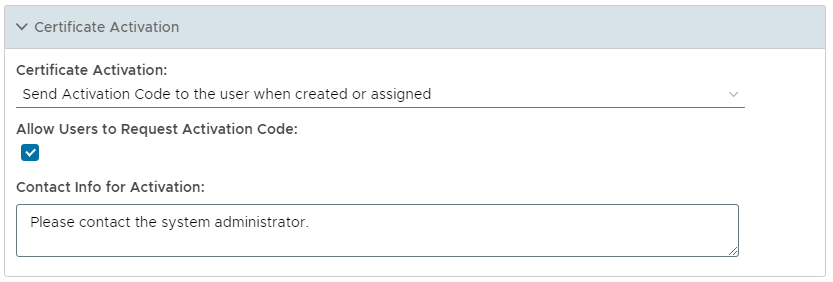
The expandable section provides certificate activation related parameters as follows;
Certificate Activation
| Section |
|---|
| Column |
|---|
| 
|
| Column |
|---|
|
| Expand |
|---|
| title | Certificate Activation: |
|---|
|
| Panel |
|---|
| borderColor | grey |
|---|
| bgColor | #F8F8F8 |
|---|
| borderStyle | dashed |
|---|
| 
- Automatically activate the certificate when created or assigned
When the certificate is created or assigned to the user it will be automatically activated.
- Send Activation Code to the user when created or assigned
When the certificate is created or assigned to the user an activation code will be sent to the user.
- Do Nothing
When the certificate is created or assigned to the user the certificate will not be activated and no activation code will be sent to the user.
|
|
| Expand |
|---|
| title | Allow Users to Request Activation Code |
|---|
|
| Panel |
|---|
| borderColor | grey |
|---|
| bgColor | #F8F8F8 |
|---|
| borderStyle | dashed |
|---|
| This option defines whether users are allowed to request activation code or not. |
|
| Expand |
|---|
| title | Contact info for activation |
|---|
|
| Panel |
|---|
| borderColor | grey |
|---|
| bgColor | #F8F8F8 |
|---|
| borderStyle | dashed |
|---|
| 
This parameter is used to customise the contact message that is sent to the user providing instructions on how to activate their certificate. |
|
|
|
...