...
| Section | ||||||||||||||||||||||||
|---|---|---|---|---|---|---|---|---|---|---|---|---|---|---|---|---|---|---|---|---|---|---|---|---|
|
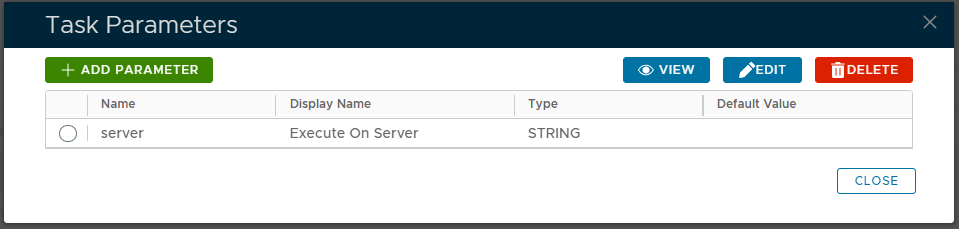
If you have multiple DualShield backend servers, then you need to specify the computer name of the server that will run this task
Select the parameter "Server" then click the  button, and a new window titled "Parameter - Edit" will open;
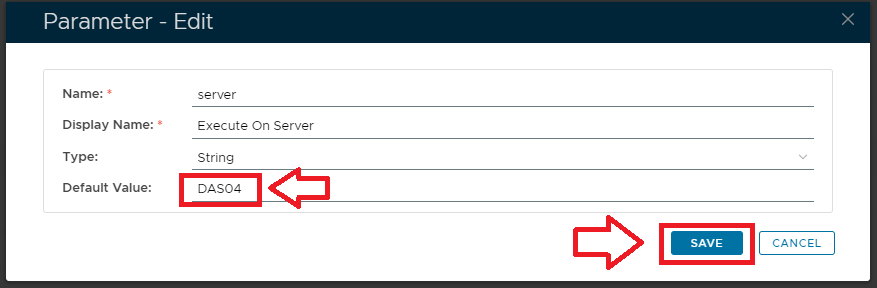
At the parameter "Default Value:" supply the name of the server the task is to run on., then click  to update the parameter.
Expand title Click here for more information on editing task parameters Include Page Editing Task Parameters Editing Task Parameters
Editing and Scheduling the Task
...
Expand title Click here for more information on Task Scheduling Include Page Scheduling Tasksa Task Scheduling Tasksa Task
Manual Task Execution
The task can be run manually from the management console by left click on the context menu of the task, then selecting "Run";
...
Expand title Click here for more information on manually executing tasks Include Page Manual Running a Task ExecutionManual Running a Task Execution