...
Click "OK", then restart the DualShield service.
You can now log into the Admin or Management Console without password.
(please note that, in safe mode, you must access the management console from the machine where DualShield is installed);
DualShield on Linux OS
| Expand | ||||||
|---|---|---|---|---|---|---|
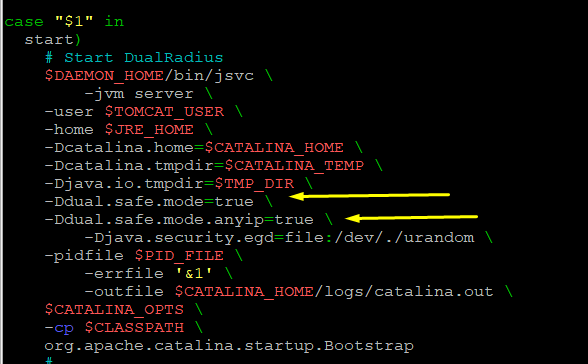
If you have DualShield Linux version installed, you should edit the file "/etc/init.d/dualshield" to achieve the same effect as in Windows
Add the following lines just after -Djava.io.tmpdir=$TMP_DIR \
See example below You must restart the service after the modification. Use the following command
|
...
Once you have enabled safe mode and fully restarted the service, you will be able log in to the Management Console without entering a password, and will then be able to change the system administrator's password using the following procedure;
(please note that, in safe mode, you must access the management console from the machine where DualShield is installed);
Log in to the management console in safe mode.
...