Introduction
Tasks provides a list of alerts that will perform tasks when the alerts specified conditions.
The following is a list of the default tasks that can be viewed by logging in to the management console then navigating to "Administration | Taskss";
...
| Column |
|---|
|
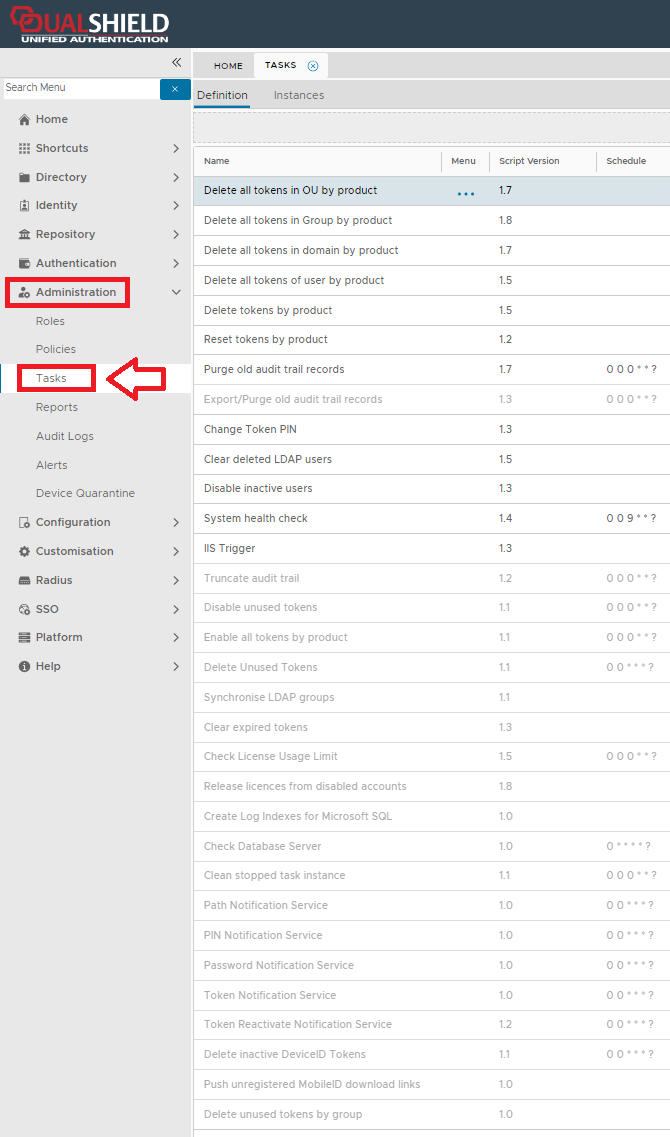 Image Removed Image Removed
|
...
...
| title | Delete all tokens in OU by product |
|---|
| Panel |
|---|
| borderColor | grey |
|---|
| bgColor | #F8F8F8 |
|---|
| borderStyle | dashed |
|---|
|
The purpose of this task is to remove all tokens from the token repository of a specific product and manufacturer, that have been assigned to users in a specific organisational unit and domain (optionally, token deletion can be further restricted to inactive tokens). |
...
| title | Delete all tokens in Group by product |
|---|
| Panel |
|---|
| borderColor | grey |
|---|
| bgColor | #F8F8F8 |
|---|
| borderStyle | dashed |
|---|
|
The purpose of this task is to remove all tokens from the token repository of a specific product and manufacturer, that have been assigned to users in a specific group and domain (optionally, token deletion can be further restricted to inactive tokens). |
...
| title | Delete all tokens in Domain by product |
|---|
| Panel |
|---|
| borderColor | grey |
|---|
| bgColor | #F8F8F8 |
|---|
| borderStyle | dashed |
|---|
|
The purpose of this task is to remove all tokens from the token repository of a specific product and manufacturer, that have been assigned to users in a specific domain (optionally, token deletion can be further restricted to inactive tokens). |
...
| title | Delete all tokens of user by product |
|---|
| Panel |
|---|
| borderColor | grey |
|---|
| bgColor | #F8F8F8 |
|---|
| borderStyle | dashed |
|---|
|
The purpose of this task is to remove all tokens from the token repository of a specific product and manufacturer, that have been assigned to a specific user (optionally, token deletion can be further restricted to inactive tokens). |
...
| title | Delete tokens by product |
|---|
| Panel |
|---|
| borderColor | grey |
|---|
| bgColor | #F8F8F8 |
|---|
| borderStyle | dashed |
|---|
|
The purpose of this task is to remove all tokens from the token repository of a specific product and manufacturer (optionally, token deletion can be further restricted to tokens that have been assigned to users). |
...
| title | Reset tokens by product |
|---|
| Panel |
|---|
| borderColor | grey |
|---|
| bgColor | #F8F8F8 |
|---|
| borderStyle | dashed |
|---|
|
The purpose of this task is to reset all tokens in the token repository of a specific product and manufacturer. |
...
| title | Purge old audit trail records |
|---|
| Panel |
|---|
| borderColor | grey |
|---|
| bgColor | #F8F8F8 |
|---|
| borderStyle | dashed |
|---|
|
The purpose of this task is to remove audited events logs from the database that are older than a specified number of days. |
...
| title | Export/Purge old audit trail records |
|---|
| Panel |
|---|
| borderColor | grey |
|---|
| bgColor | #F8F8F8 |
|---|
| borderStyle | dashed |
|---|
|
The purpose of this task is to export audit data from the database. Once the data has been exported you may optionally purge the deleted data. |
...
| Panel |
|---|
| borderColor | grey |
|---|
| bgColor | #F8F8F8 |
|---|
| borderStyle | dashed |
|---|
|
The purpose of this task is to set a new PIN for all tokens that meet the task parameters. |
...
| title | Clear deleted LDAP users |
|---|
| Panel |
|---|
| borderColor | grey |
|---|
| bgColor | #F8F8F8 |
|---|
| borderStyle | dashed |
|---|
|
When users are deleted from an external LDAP identity sources, the user deletion may result in licenses being allocated to users that cannot be accessed in the management console. |
...
| title | Disable inactive users |
|---|
| Panel |
|---|
| borderColor | grey |
|---|
| bgColor | #F8F8F8 |
|---|
| borderStyle | dashed |
|---|
|
The purpose of this task is to disable all users in a domain that are have been inactive for more than the specified number of days. |
...
| Panel |
|---|
| borderColor | grey |
|---|
| bgColor | #F8F8F8 |
|---|
| borderStyle | dashed |
|---|
|
The system health check task is enabled by default, and by default is scheduled to run at 9 AM every day. |
...
| Panel |
|---|
| borderColor | grey |
|---|
| bgColor | #F8F8F8 |
|---|
| borderStyle | dashed |
|---|
|
The purpose of this task is to delete sessions from IIS when the token is disabled. |
...
| title | Truncate audit trail |
|---|
| Panel |
|---|
| borderColor | grey |
|---|
| bgColor | #F8F8F8 |
|---|
| borderStyle | dashed |
|---|
|
The purpose of this task is to remove all audited events logs from the database. |
...
| title | Disable unused tokens |
|---|
| Panel |
|---|
| borderColor | grey |
|---|
| bgColor | #F8F8F8 |
|---|
| borderStyle | dashed |
|---|
|
The purpose of this task is to disable all tokens that are have been unused for more than the specified number of days. |
...
| title | Enable all tokens by product |
|---|
| Panel |
|---|
| borderColor | grey |
|---|
| bgColor | #F8F8F8 |
|---|
| borderStyle | dashed |
|---|
|
The purpose of this task is to enable all tokens in the token repository of a specific product. |
...
| title | Delete unused tokens |
|---|
| Panel |
|---|
| borderColor | grey |
|---|
| bgColor | #F8F8F8 |
|---|
| borderStyle | dashed |
|---|
|
The purpose of this task is to remove all tokens from the token repository that are not currently used. |
...
| title | Synchronise LDAP groups |
|---|
| Panel |
|---|
| borderColor | grey |
|---|
| bgColor | #F8F8F8 |
|---|
| borderStyle | dashed |
|---|
|
If you have moved user group(s) in your AD, run this task to synchronise with your DualShield server. |
...
| title | Clear expired tokens |
|---|
| Panel |
|---|
| borderColor | grey |
|---|
| bgColor | #F8F8F8 |
|---|
| borderStyle | dashed |
|---|
|
The purpose of this task is to clear all tokens for the specified product code and manufacturing code that are have passed their token expiry date. |
...
| title | Check License Usage Limit |
|---|
| Panel |
|---|
| borderColor | grey |
|---|
| bgColor | #F8F8F8 |
|---|
| borderStyle | dashed |
|---|
|
This purpose of this task is to check if the current percentage of licenses consumed exceeds the threshold percentage stored in the task parameter "threshold" |
...
| title | Release licences from disabled accounts |
|---|
| Panel |
|---|
| borderColor | grey |
|---|
| bgColor | #F8F8F8 |
|---|
| borderStyle | dashed |
|---|
|
The purpose of this task is to free up licenses consumed by externally disabled user accounts, i.e. user accounts that are disabled in the Active Directory. |
...
| title | create Log indexes for Microsoft SQL |
|---|
| Panel |
|---|
| borderColor | grey |
|---|
| bgColor | #F8F8F8 |
|---|
| borderStyle | dashed |
|---|
|
The purpose of this task is to create indexes on the Log and Log Field tables. |
...
| title | Check Database Server |
|---|
| Panel |
|---|
| borderColor | grey |
|---|
| bgColor | #F8F8F8 |
|---|
| borderStyle | dashed |
|---|
|
The purpose of this task is to check if the database is out of sync, and if so an error "E_DATABASE_SERVER_SYNC_ERROR" will be raised in the audit logs. |
...
| title | Clean stopped task instance |
|---|
| Panel |
|---|
| borderColor | grey |
|---|
| bgColor | #F8F8F8 |
|---|
| borderStyle | dashed |
|---|
|
This purpose of this task will clear finished tasks from the task list. |
...
| title | Path Notification Service |
|---|
| Panel |
|---|
| borderColor | grey |
|---|
| bgColor | #F8F8F8 |
|---|
| borderStyle | dashed |
|---|
|
The "Path Notification Service" task is used for GridID path and identifies when it is due to expire, or if it has expired. |
...
| title | PIN Notification Service |
|---|
| Panel |
|---|
| borderColor | grey |
|---|
| bgColor | #F8F8F8 |
|---|
| borderStyle | dashed |
|---|
|
This task will send out notification to all users with token pins that are due to expire. |
...
| title | Password Notification Service |
|---|
| Panel |
|---|
| borderColor | grey |
|---|
| bgColor | #F8F8F8 |
|---|
| borderStyle | dashed |
|---|
|
This task will send out notification to all users with static passwords that due to expire.. |
...
| title | Token Notification Service |
|---|
| Panel |
|---|
| borderColor | grey |
|---|
| bgColor | #F8F8F8 |
|---|
| borderStyle | dashed |
|---|
|
This task periodically checks if tokens are about to reach their renewal time, and sends out notification messages to the users. |
...
| title | Token Reactivate Notification Service |
|---|
| Panel |
|---|
| borderColor | grey |
|---|
| bgColor | #F8F8F8 |
|---|
| borderStyle | dashed |
|---|
|
The "Token Reactivate Notification Service" task periodically checks if DeviceID tokens are about to need reactivation will send out notification messages to the users if required. The notifications that are sent are specified in the DeviceID policy setting parameter "Reactivate notification:" (in the "Reactivate" section). |
...
| title | Delete inactive DeviceID Tokens |
|---|
| Panel |
|---|
| borderColor | grey |
|---|
| bgColor | #F8F8F8 |
|---|
| borderStyle | dashed |
|---|
|
The purpose of this task is to remove all inactive DeviceID tokens from the token repository. |
...
| title | Push unregisteredd MobileID download links |
|---|
| Panel |
|---|
| borderColor | grey |
|---|
| bgColor | #F8F8F8 |
|---|
| borderStyle | dashed |
|---|
|
The purpose of this task is to send download links to users with unregistered mobileID tokens. |
...
| title | Delete unused tokens by group |
|---|
| Panel |
|---|
| borderColor | grey |
|---|
| bgColor | #F8F8F8 |
|---|
| borderStyle | dashed |
|---|
|
The purpose of this task is to remove all unused tokens from the token repository that are assigned to users in a specified group. |
Task Parameters
...
Editing and Scheduling the Task
Viewing and Editing the task
The task can be edited by left clicking on the context menu of the task and selecting "Edit";
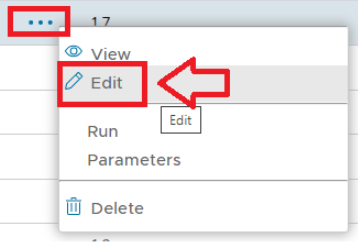 Image Removed
A new window will now open titled "Task - Edit" that can be used to edit the task parameters.
Scheduling the Task
...
Manual Task Execution
...
Related Articles
...