Windows Logon Agent now only supports TLS1.2 for earlier versions and TLS 1.2 & 1.3 for the latest. The administrator may want to configure safer cipher suites for SSL connections.
| Expand | ||
|---|---|---|
| ||
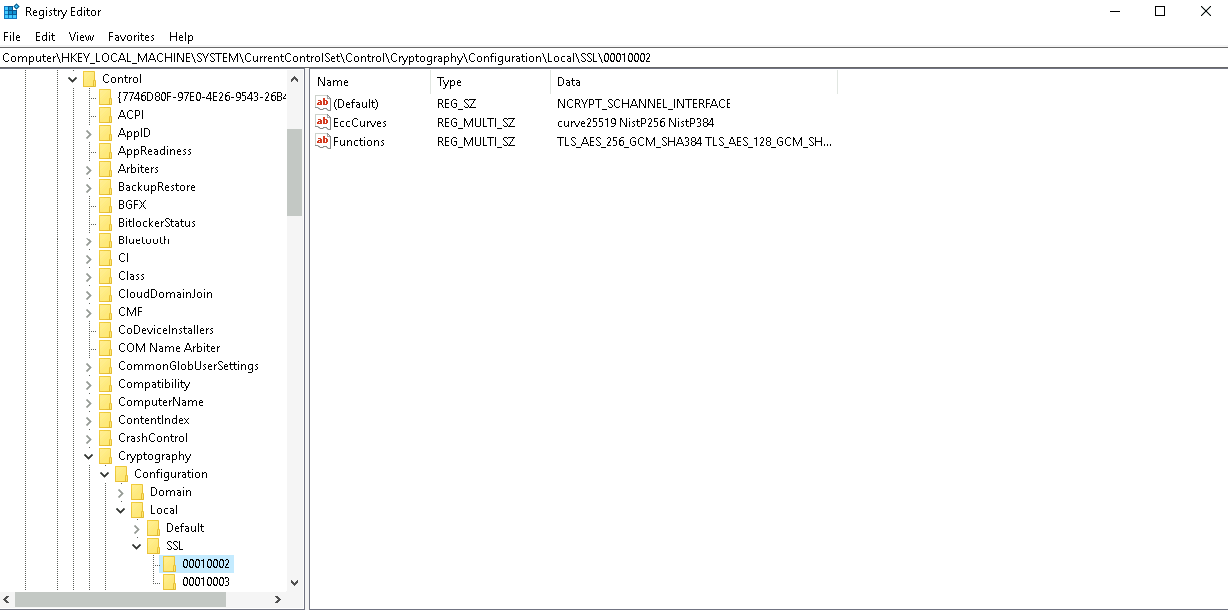
The general way for an administrator to configure is to add or remove cipher suites in the registry editor. The path to do this is "HKEY_LOCAL_MACHINE\SYSTEM\CurrentControlSet\Control\Cryptography\Configuration\Local\SSL\00010002" and configure ciphers for the multi-string value "Functions".
|
| Expand | ||
|---|---|---|
| ||
The general way for an administrator to configure is to add or remove cipher suites in the registry editor. The path to do this is "HKEY_LOCAL_MACHINE\SOFTWARE\Deepnet Security\DUAP\WIN |
After changing the settings, the agent service needs to be restarted.
...