Versions Compared

Key

  • This line was added.
  • This line was removed.
  • Formatting was changed.

...

Section


Column
width50%


Column
width50%


Expand
titleCategory:


Panel
borderColorgrey
bgColor#F8F8F8
borderStyledashed

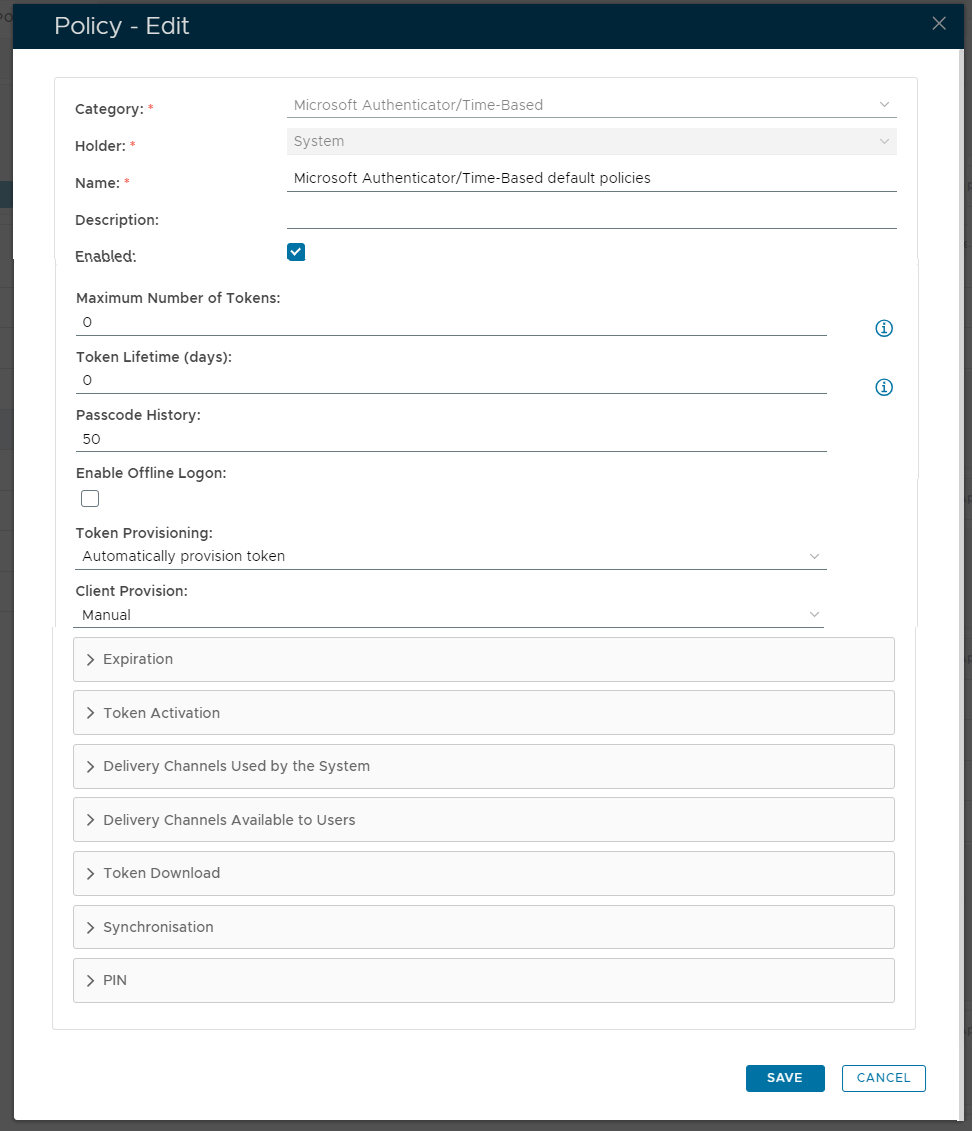
The category for this policy is "Microsoft Authenticator/Time-Based" (this property cannot be edited).


Expand
titleHolder:


Panel
borderColorgrey
bgColor#F8F8F8
borderStyledashed

The holder of this policy is "System" (this property cannot be edited).


Expand
titleName:


Panel
borderColorgrey
bgColor#F8F8F8
borderStyledashed

The name assigned to identify the Microsoft Authenticator/Time Based default policy by the System Administrator.


Expand
titleDescription:


Panel
borderColorgrey
bgColor#F8F8F8
borderStyledashed

The System Administrator may use this field to annotate this policy.


Expand
titleEnabled


Panel
borderColorgrey
bgColor#F8F8F8
borderStyledashed

This option allows the System Administrator to enable or disable this policy.


Expand
titleMaximum Number of Tokens:


Panel
borderColorgrey
bgColor#F8F8F8
borderStyledashed

The maximum number of GoogelAuthenticataor Googel Authenticator tokens allowed in a user account (enter "0" if there is no limit).


Expand
titleToken Lifetime (days):


Panel
borderColorgrey
bgColor#F8F8F8
borderStyledashed

This value indicates how many days the token will be active (enter "0" if there is no limit).


Expand
titlePasscode History:


Panel
borderColorgrey
bgColor#F8F8F8
borderStyledashed

This value specifies the maximum number of passcodes that can be kept in the History List (this list is used to avoid repeat usage of recent passcodes).


Expand
titleEnable Offline:


Panel
borderColorgrey
bgColor#F8F8F8
borderStyledashed

This option allows the system administrator to allow users to logon whilst offline.


Expand
titleToken Provisioning:


Panel
borderColorgrey
bgColor#F8F8F8
borderStyledashed

In order to use MobileID Authentication in DualShield, the user must first have a MobileID token in their user account in the DualShield Server. 

The token can be manually created by the system administrator for the user using the DualShield Management Console or manually created by the DualShield Server if the MobileID's policy is set up to automatically provisioning tokens to users.

  • Automatically provision token
    Automatically create a token for a user when needed.

  • Manual
    Tokens will be sent manually to users.


Expand
titleClient Provision:


Panel
borderColorgrey
bgColor#F8F8F8
borderStyledashed

This field determines how DualShield deploys the MobileID client to a user;

  • Automatically push
    DualShield will automatically send the MobileID download link via the specified Message Channel.

    If the Token Authorisation Code is required and its policy is set to automatically send Authorisation Code, then the Authorisation Code will also be sent in the same message.

    To complete automatic provisioning of clients you will also need to configure the Message Channel fields "Primary Delivery Channel:" and "Secondary Delivery Channel:"

  • Manual
    DualShield will not send out a download link to the user (the user will need to find and download the MobileID from app stores).


Expandable Policy Sections


...