...
| Section |
|---|
|
| Column |
|---|
Launch Mobility Client on the end-user device, and click Connect. |
| Column |
|---|
|
| Panel |
|---|
| borderColor | #9EBEE5 |
|---|
| bgColor | #FFFFFF |
|---|
| borderWidth | 1px |
|---|
| 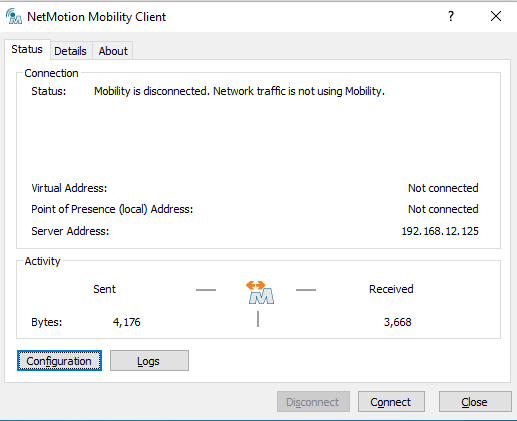 Image Removed Image Removed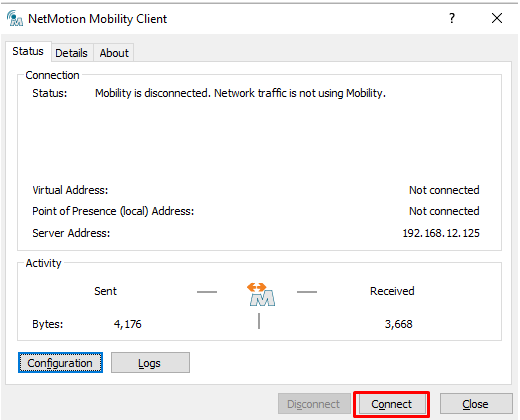 Image Added Image Added
|
|
|
| Section |
|---|
|
| Column |
|---|
You may get a prompt regarding Device Certificate Logon. This is covered on another page For User Authentication click I do not have a valid certificate
|
| Column |
|---|
|
| Panel |
|---|
| borderColor | #9EBEE5 |
|---|
| bgColor | #FFFFFF |
|---|
| borderWidth | 1px |
|---|
| Certificate Logon Graphic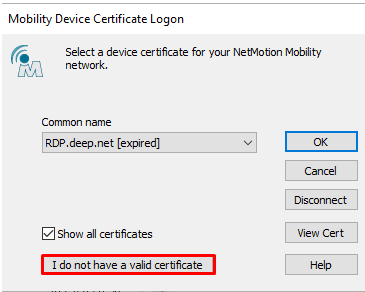 Image Added Image Added |
|
|
You will now be prompted for the logon steps as specified in your Logon Procedure (see Build a Logon Procedure and Application for NetMotion)
...