...
| Section |
|---|
|
| Column |
|---|
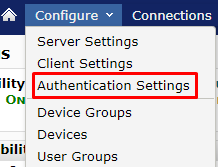
Click on Configure>Authetication Settings
|
| Column |
|---|
|
| Panel |
|---|
| borderColor | #9EBEE5 |
|---|
| bgColor | #FFFFFF |
|---|
| borderWidth | 1px |
|---|
| 
|
|
|
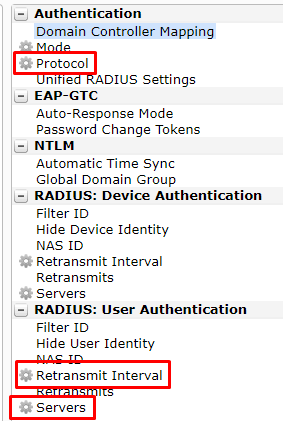
Select the custom newly created Authentication Profile for RADIUS, e.g. DualShield RADIUS
| Section |
|---|
|
| Column |
|---|
There are three settings that need to be applied. The settings are found in the middle pane. | Section | Option |
|---|
| Authentication | Protocol | | RADIUS: User Authentication | Retransmit Interval | | RADIUS: User Authentication | Servers |
|
| Column |
|---|
|
| Panel |
|---|
| borderColor | #9EBEE5 |
|---|
| bgColor | #FFFFFF |
|---|
| borderWidth | 1px |
|---|
| 
|
|
|
...
| Section |
|---|
|
| Column |
|---|
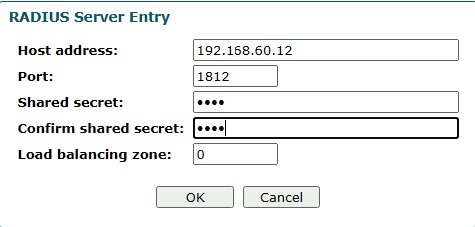
In the RADIUS Server Entry, please enter the following information: | Option | Value |
|---|
| Host address: | Enter the IP address of machine that your DualShield Radius Server was installed | | Port: | 1812 | Shared Secret: & Confirm Shared Secret: | The shared secret will match the one you created when Registering NetMotion as a RADIUS client |
Click: OK |
| Column |
|---|
|
| Panel |
|---|
| borderColor | #9EBEE5 |
|---|
| bgColor | #FFFFFF |
|---|
| borderWidth | 1px |
|---|
| 
|
|
|
| Section |
|---|
|
| Column |
|---|
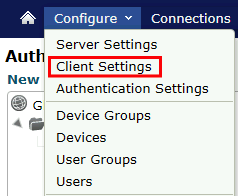
Click on Configure>Client Settings |
| Column |
|---|
|
| Panel |
|---|
| borderColor | #9EBEE5 |
|---|
| bgColor | #FFFFFF |
|---|
| borderWidth | 1px |
|---|
| 
|
|
|
...
| Section |
|---|
|
| Column |
|---|
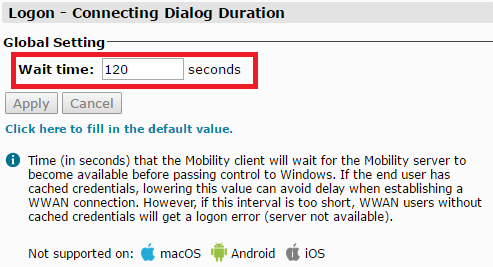
Change Wait time to 120 seconds Click Apply |
| Column |
|---|
|
| Panel |
|---|
| borderColor | #9EBEE5 |
|---|
| bgColor | #FFFFFF |
|---|
| borderWidth | 1px |
|---|
| 
|
|
|
Related Articles