...
| Section |
|---|
|
| Column |
|---|
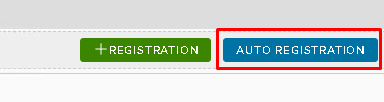
Under the Agent tab click on Auto Registration |
| Column |
|---|
|
| Panel |
|---|
| borderColor | #9EBEE5 |
|---|
| bgColor | #f0f0f0 |
|---|
| borderWidth | 1px |
|---|
| 
|
|
|
| Section |
|---|
|
| Column |
|---|
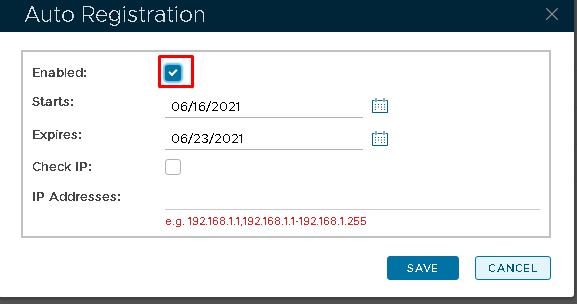
In the Auto Registration box, tick Enabled and enter an expiry date.
Then click Save |
| Column |
|---|
|
| Panel |
|---|
| borderColor | #9EBEE5 |
|---|
| bgColor | #f0f0f0 |
|---|
| borderWidth | 1px |
|---|
| 
|
|
|
Please now use the following guide which details how to install the Windows Logon Agent onto your PC.
Installation [AGENT]Install Windows Logon Agent
Please make sure you follow the preparation steps of creating a Logon Procedure and Application, which is mentioned at the beginning of the guide. Also during installation please make sure the following two options are enabled.
...