This will involve a period of downtime as you will need to stop the DualShield Server service first.
You will need to delete the following files & folders
C:\Program Files\Deepnet DualShield\tomcat\webapps\dmc
C:\Program Files\Deepnet DualShield\tomcat\webapps\dmc.war
C:\Program Files\Deepnet DualShield\tomcat\ssoapp\appsso
C:\Program Files\Deepnet DualShield\tomcat\ssoapp\appsso.war
C:\Program Files\Deepnet DualShield\tomcat\dssapp\dss
C:\Program Files\Deepnet DualShield\tomcat\dssapp\dss.war
C:\Program Files\Deepnet DualShield\tomcat\dpsapp\dps
C:\Program Files\Deepnet DualShield\tomcat\dpsapp\dps.war
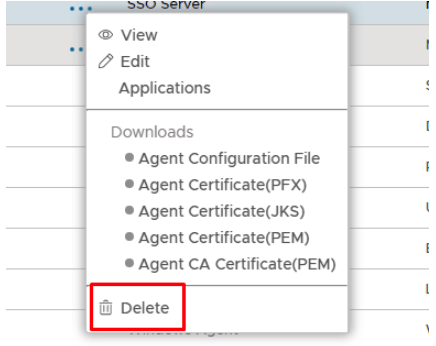
Once you have deleted the above files you then restart the service and log on to the Administration Console where you will need to go to Authentication>Agents and delete the following agents:
Management Console
SSO Server
Self-Service Console
Provisioning Server
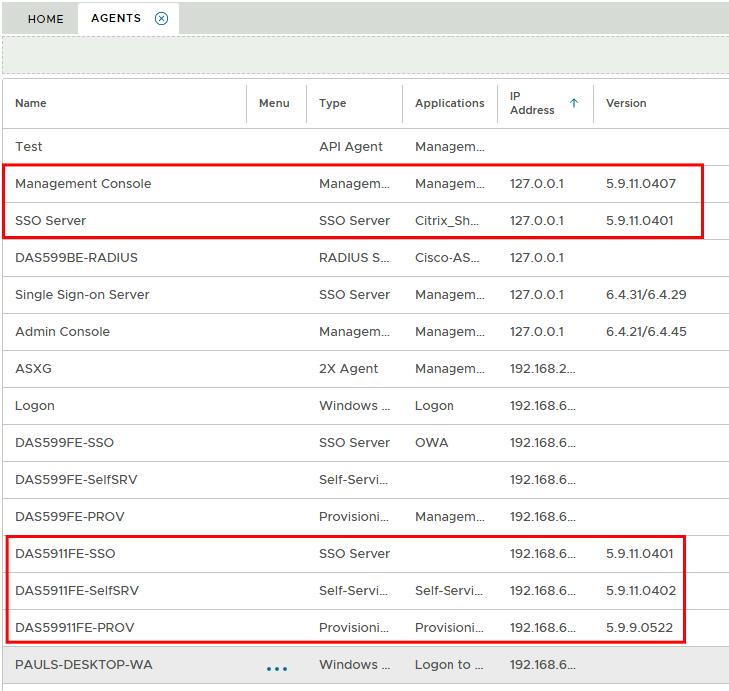
You can see from the above picture it is everything with the old version 5.9.x is classed as legacy
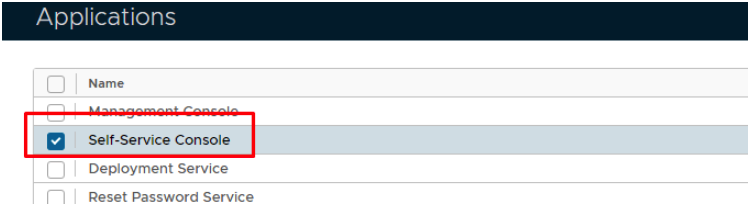
To delete an agent you will need to remove the bound application first.
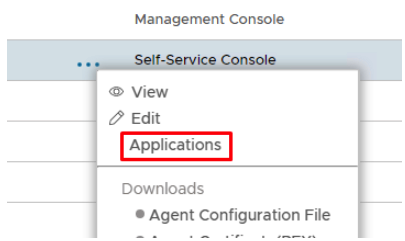
Untick the application
You will then be able to delete the relevant agent