Licenses are assigned on a per-user bases, and are considered as consumed if user is considered active, and has tokens assigned to them.
What qualifies as an active user, and how do you check it ?
To check the status of a user navigate to "Directory | Users", Select the domain of the user then click "SEARCH" and you will be presented with a list of users for the selected domain;

Each user has two status values - one internal and the other external.
The external users status is taken from your external directory (usually AD) and may differ from the internal status.
Licenses are only consumed by a user if they have an internal status set to "Active".
What qualifies as an active token, and how do you check it ?
If a user is active but not currently assigned any tokens then they will not normally be consuming a user license, however users with tokens will still not be consuming a user license if the tokens are not active.
To check the status of tokens that have been assigned to a specific user left click on the context menu of the user and select the option "Tokens";

A list of all tokens assigned to the selected user will then be displayed;
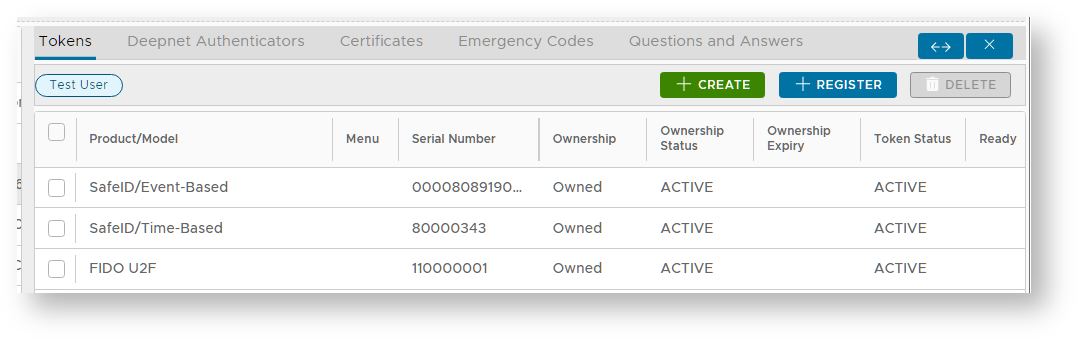
If any of the tokens listed are active, then the users will be consuming a license.
Also In the case of an inactive token being created,...
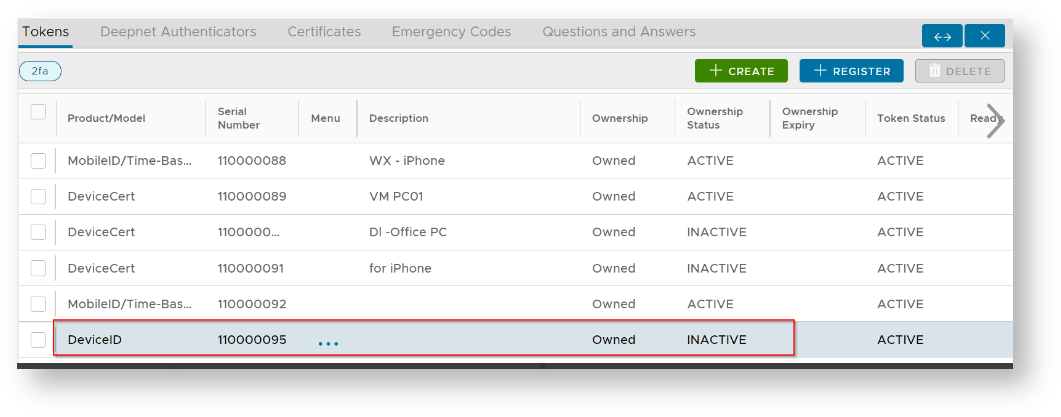
For example, during the registration of a DeviceID token, this will also count toward license consumption.
What can cause a user to be consuming a license, and how do we check who are consuming licenses ?
In addition to active tokens being assigned to a user, a user may also consume a license if they have any Question and Answer details or certificates stored against the user. Both can be checked by examining the content of the "Users Use License" report;

If a user has non-zero values in either of the columns "Tokens", "Q&A" or "Certificates", then they will be consuming a license.
...