...
To make the request, click the link below.
https://supportservices.deepnetsecurity.com/csp/SeedFileRequests
Follow the steps below:
Table of Contents
Step 1 - Find Your Order
...
- Your Purchase Order Number
- Our Invoice Number
- Our Shipment Number
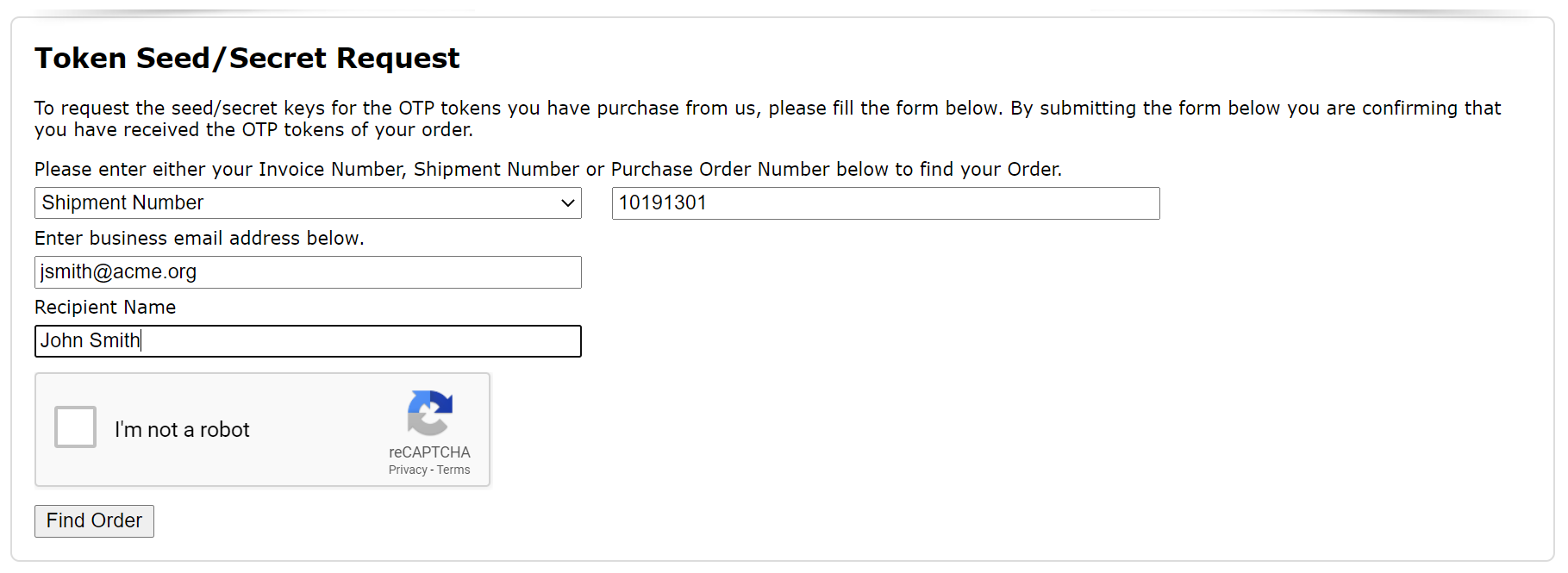

You also need to enter your business email address.
...
Once you have specified the shipments, you will be asked to verify each shipment by providing the serial number of one of the tokens in each the shipment.

Step 3 - Select Token File Encryption
For security, the token seed/secret file will be encrypted by a password and/or PGP key.
...
First, you have to decide if you want to receive the seed/secret keys of all tokens in one file, or in seperate separate files by shipments.

Then, you have to decide how you want the token file to be encrypted. You have 3 options:
- Password only
- PGP only
- Password and PGP
We recommend PGP encryption as it is more secure than passwordFor simplicity, select the password option. For better security, select the PGP encryption option. If you have not used PGP, then please refer to the guide below
...
For the best security, you can encrypt the token file by both password and PGP key.


You must If you select to use the password option, you must create a new password and save a copy of the password in a safe place, as you will need it to decrypt the seed/secret files when you have received them.
If you select to use the PGP option, you must create a new PGP key and save a copy of the your password and/or PGP private key in a safe place, as you will need it to decrypt the seed/secret files when you have recevie received them. (If you are using the WinGPG software, then your PGP private key is automaticaly automatically saved by the software itself).If you are a regular customer, then you might want to save the password and/or PGP key in your account in our system, so that next time you do not need to provide a new password and/or PGP key. Check the option "Save Password" and/or "Save PGP Key" if you wish to our system to use them next time.
Step 4 - Select Token File Format
Next, you need to specify the format of the seed/secret file that you wish to receive.


Select one of the following There are 5 options:
- Azure Entra MFA CSV
- Entra MFA JSON
- DualShield
- Duo CSV
- OKTA CSV
- PSKC - Passphrase-Based Key
- PSKC - Plain text
- PSKC - Pre-Shared Key
- SafeID Token Service CSV
- Sales Force CSV
- Custom CSV
All options are self-explanatory except the "Custom CSV" option.
The "Custom CSV" option allows you to specify your own CSV data content.
| Expand | ||
|---|---|---|
| ||
A custom CSV file consists of a list of fields, and each field has a name and value. Click on "Add Field" button to add a new field. Enter the name of the filed, then specify the value of the field. You can either specify a fixed value or select one of the token's properties.
Also, you need to specify whether or not you want the list of field names to be included CSV file as the first row - the header row. Finally, you need to specify how the seed/secret key should be encoded. There are 3 options:
|

Finally, click on the "Submit" button to submit your request.
...
If you have several shipments and decided to recevie receive seed/secret files seperatelyseparately, then you will receive several emails.
...
If the seed file is PGP encrypted, then you will need to decypt it by using the WinGPG tool
| Expand | ||
|---|---|---|
| ||
You will be prompted to entre the passphrase of your PGP key (Please note that this passphase is the password of your PGP key, not the password of the seed file)
The seed file is delivered as a zip file. You need to unzip it after PGP decryption
If the seed is password encrypted then you will be asked to enter the seed file password to unzip the file.
|


Step 8 - Confirm Download
Now that you have received your token seed/secret file, and you have successfuly sucessfuly decrypted it, we suggest that you should click the confirmation link in the email. By confirming it, the download link will be deleted immediately. This is an addtional additional measurement for security.
