NOTE: The latest Linux distributions generally use Wayland protocol. In order to install DualShield in GUI mode for non-root user, you need to execute the following command before the installation.
| Code Block | ||||
|---|---|---|---|---|
| ||||
xhost si:localuser:root |
Execute the command below to start the installation:
| Code Block | ||||
|---|---|---|---|---|
| ||||
sudo ./setupdualshieldxxx.bin |
in which xxx is the version & build number.
...
To enable the Agent Auto Registration feature, login to the DualShield Management Console, navigate to “Authentication | Agents” and click “Auto Registration” on the toolbar.
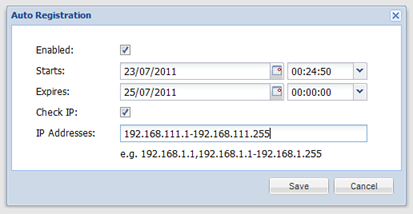
Once you have enabled the Agent Auto Registration feature in your DualShield server, back to the installation step you need to provide the Registration URL which is the address of your DualShield Authentication Sever in the form of a URL:
...
in which “FQDN” is the Fully-Qualified-Domain-Name of your DualShileld DualShield back-end server, and “PORT” is the port number of the authentication service.
...