Bind the Application to an SSO Server Agent
| Section |
|---|
|
| Column |
|---|
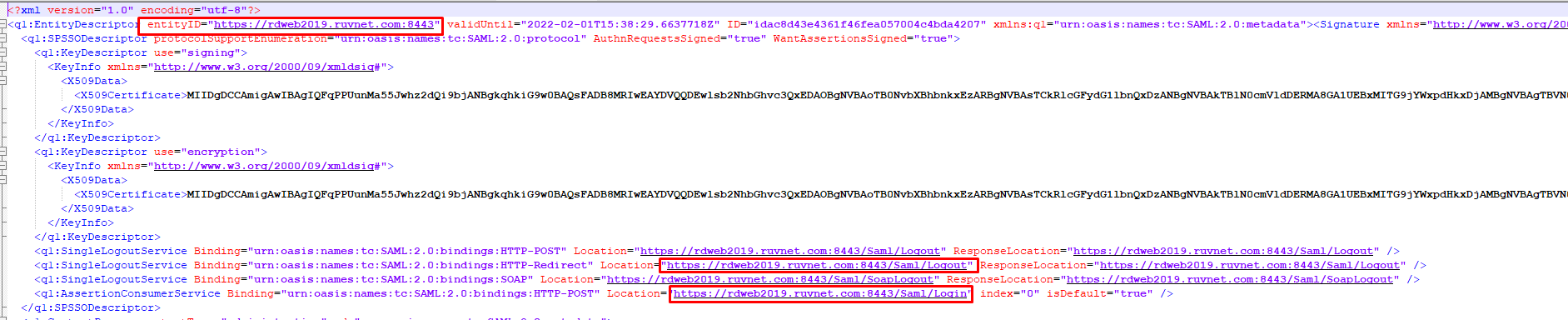
It is recommended to open the SP Metadata file you obtained from the previous section CompleteFTP SAML Configuration in Notepad++ You need to make a note of the following information. EntityID Assertion Consumer Service Location Single Logout Service Location
|
| Column |
|---|
|
| Panel |
|---|
| borderColor | #9EBEE5 |
|---|
| bgColor | #f0f0f0 |
|---|
| borderWidth | 1px |
|---|
| 
|
|
|
Create a Service Provider Profile
| Section |
|---|
|
| Column |
|---|
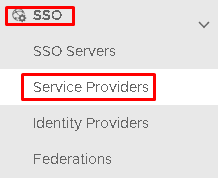
Go to SSO>Service Providers |
| Column |
|---|
|
| Panel |
|---|
| borderColor | #9EBEE5 |
|---|
| bgColor | #f0f0f0 |
|---|
| borderWidth | 1px |
|---|
| 
|
|
|
Click on  on the top right.
| Section |
|---|
|
| Column |
|---|
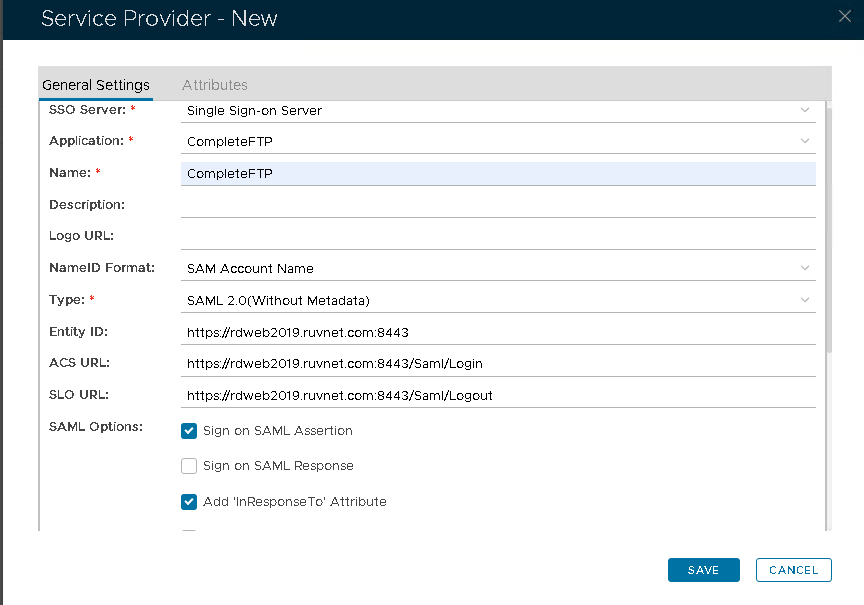
Fill in the details as per screenshot on right and make sure you select SAML 2.0(Without Metadata) as Type.
Enter the EntityID, ACS and SLO information, noted from the SP Metadata file. Make sure both Sign on SAML Assertion and Add 'InResonse To' Attribute checkboxes are checked.
Click Save. |
| Column |
|---|
|
| Panel |
|---|
| borderColor | #9EBEE5 |
|---|
| bgColor | #f0f0f0 |
|---|
| borderWidth | 1px |
|---|
| 
|
|
|