The "Push Token" message template is used by the DualShield server when it sends users an email or SMS message that contains the user's OTP token information, such as the token's download link or the token's QR code etc.
You must customize the message template according to your requirements.
SMTP Template
If you want the server to push OTP tokens to users by email, then you need to customize the SMTP Template
Navigate to Customization | Message Templates | Push Token | SMTP Templates
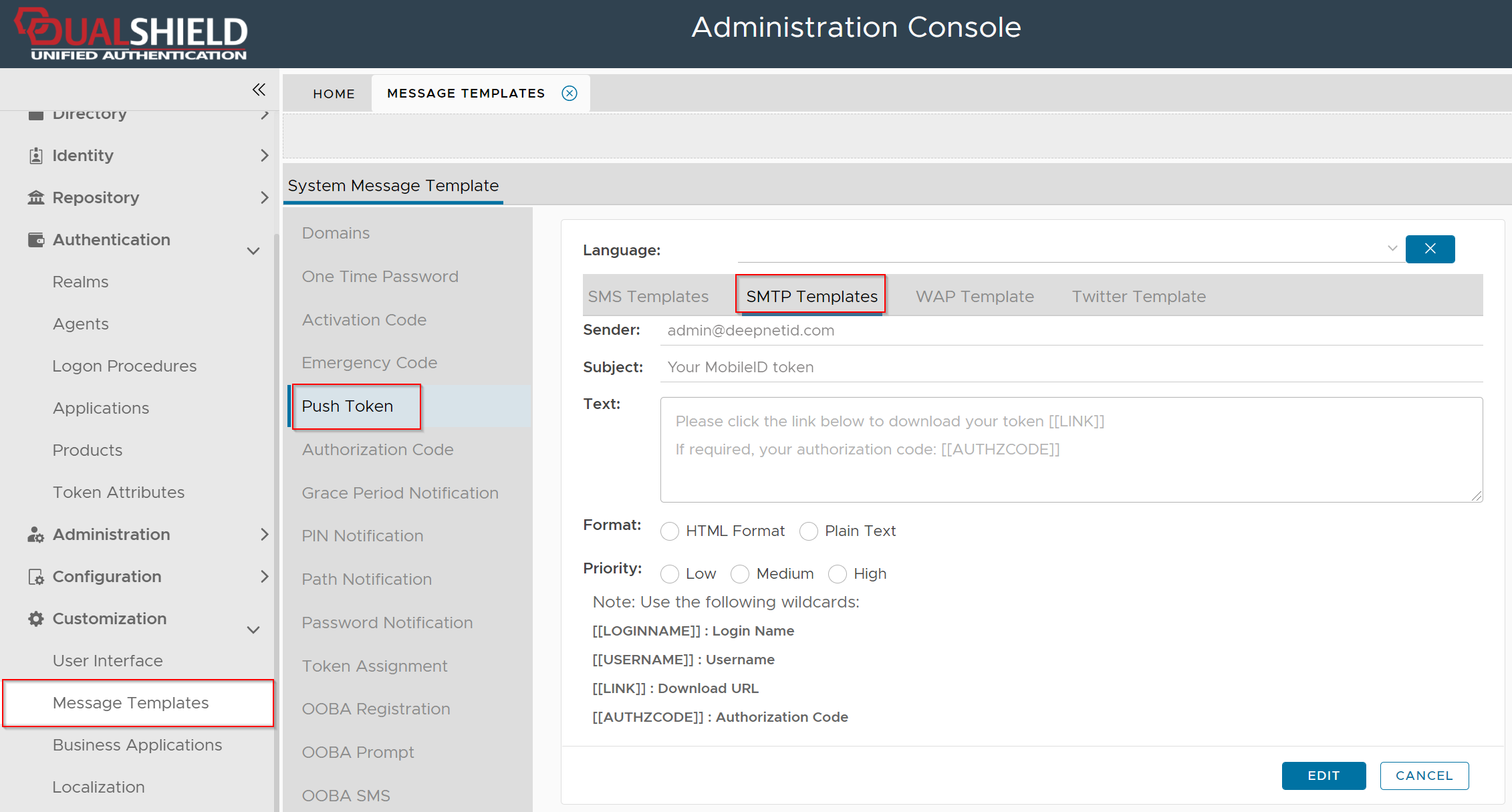
Typically, you would need to change the Sender, Subject, and Text field which is the body of the message.
There are 3 wildcards that you can use in the message body depending on your requirements
| Wildcard | Remarks | Examples |
|---|---|---|
[[LINK]] | This wildcard represents the download link of the user's MobileID token. Use this wildcard if you want to send the token's download link to the user. | |
[[QRCODE]] | This wildcard represents the QR code image of the user's OTP token. Use this wildcard if you want to send the token's QR code to the user. | |
[[AUTHZCODE]] | Depending on the token's policy, installing an OTP token might require an authorization code. This wildcard represents the authorization code of the user's token if it is required. |