Many organizations have blocked the Microsoft Outlook App for iOS and Android, for some security concerns. Following are 2 main concerns
1 - Your user credentials and emails are stored in the Microsoft cloud server
Outlook App for iOS and Android connects to a server or service hosted in the cloud. It does not connect directly to your corporate Exchange server. When you configure an account in Outlook App on iOS and Android, the app connect to a cloud service and the cloud service connects to your mailbox on your on-premises Exchange server on your behalf. The cloud service will store your user credential and cache your emails.
Not only that you might not trust Microsoft to securely store your data including your credentials, providing your user credentials to a third party is a breach of many IT usage policies, and the app doesn’t make clear to end users that this is occurring. In fact, the typical end user would have no idea that this is happening.
2 - Outlook App does not always provide a unique device ID
If a user runs the Outlook App on multiple devices of the same OS, then Outlook App will provide the same device ID for the user on those devices. This will weaken the enforcement of MFA that is based on the device ID.
For organizations that have a problem with any of the concerns above, you can block the Outlook App from your Exchange mailboxes. Microsoft provides a guide below:
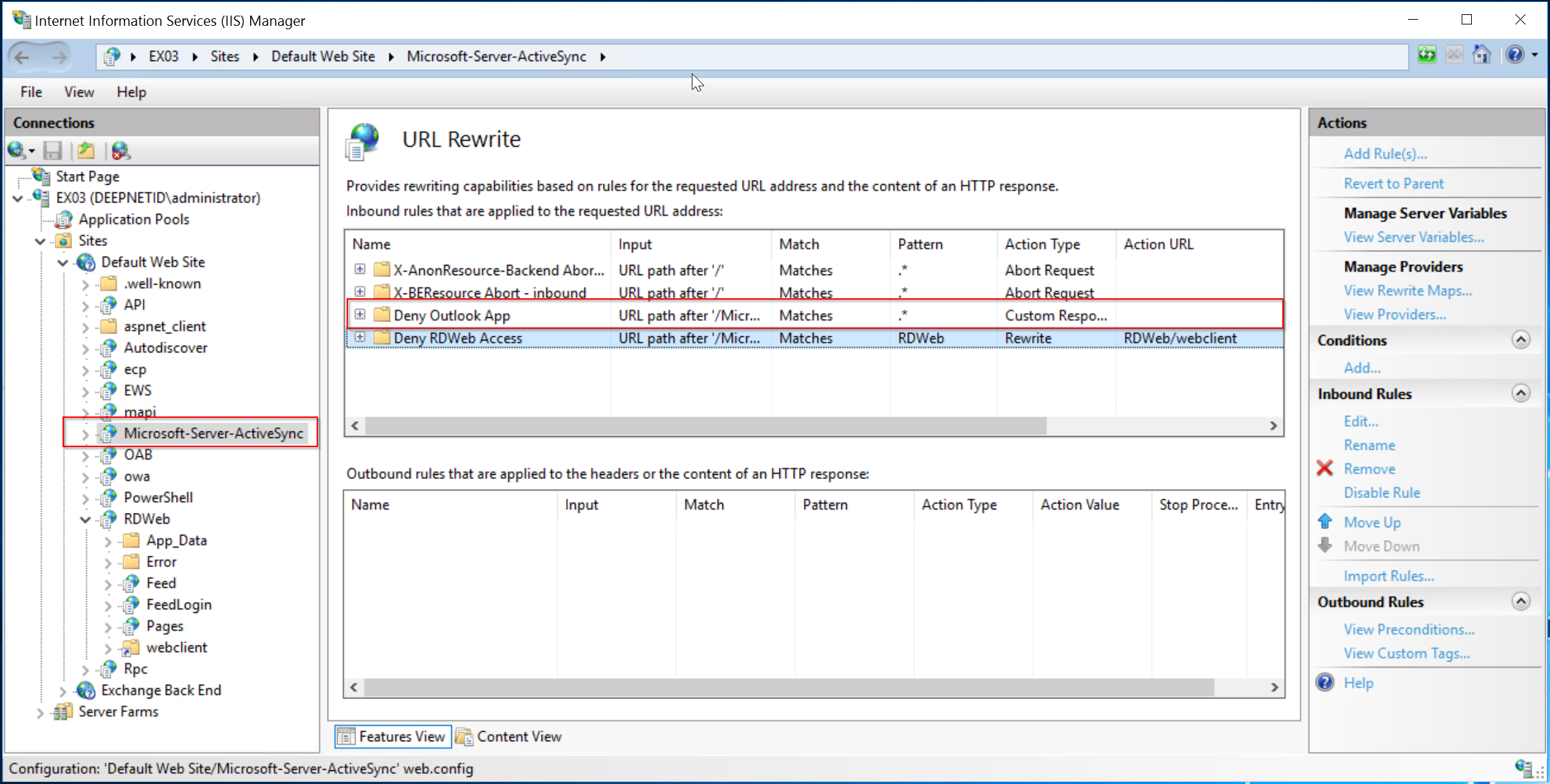
We recommend a more direct and effective way below:
On your Exchange servers, add a URL Rewrite rule as follows