In the DualShield authentication server we need to create an application which will be used for the two-factor authentication in Tivoli WebSeal. An application in DualShield needs a logon procedure which defines how users will be authenticated when they attempt to logon to the application.
Firstly, create a Web SSO logon procedure:
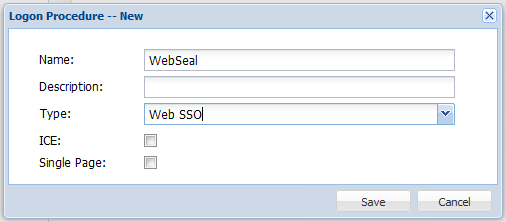
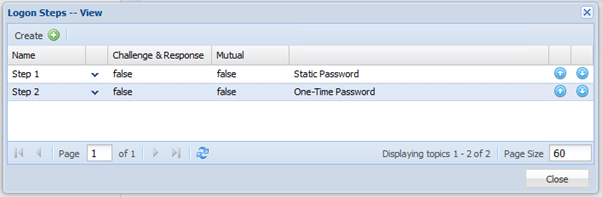
Then, modify its logon steps and add two logon steps:
The next step is to create an application in DualShield for the Web application in your WebSeal, and publish the application on the DualShield SSO server.

Use the Self-Test function to verify that the application is ready.
We also need to create SSO Service Provider for your WebSeal.
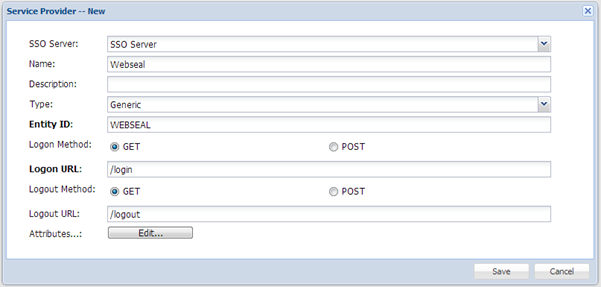
The “Type” of the Service Provider must be set to “Generic”.
You need to enter a text string in the “EntityID” field that is use to uniquely identify the Service Provider. The EntityID should only contains alphanumeric letters.
Now, click the “Edit” button next to the “Attributes” label.
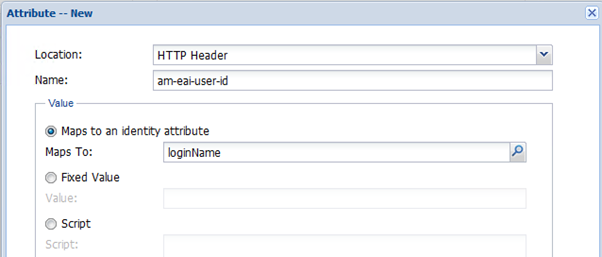
You must add the attribute named “am-eai-user-id” and maps its value to the user’s “loginName” identity attribute, as shown above.
You can add other attributes as desired.