- In NPS, expand "Policies" and select "Connection Request Policies"
- In the middle panel, select "TS GATEWAY AUTHORIZATION POLICY"
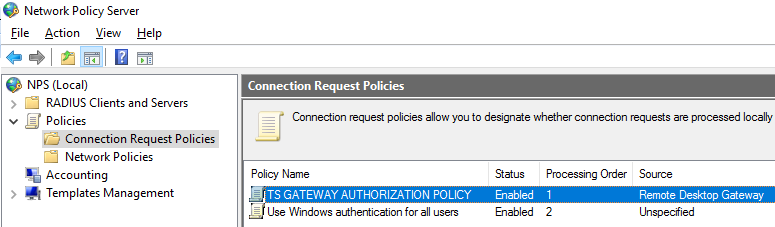
- Right click the Properties of "TS GATEWAY AUTHORIZATION POLICY", select "Settings" tab.
- In left panel, select the "Authentication".
- Select "Forward requests to the following remote RADIUS server group for authentication".
In the dropdown list, select the server group which was configured earlier, e.g. "TS GATEWAY SERVER GROUP".
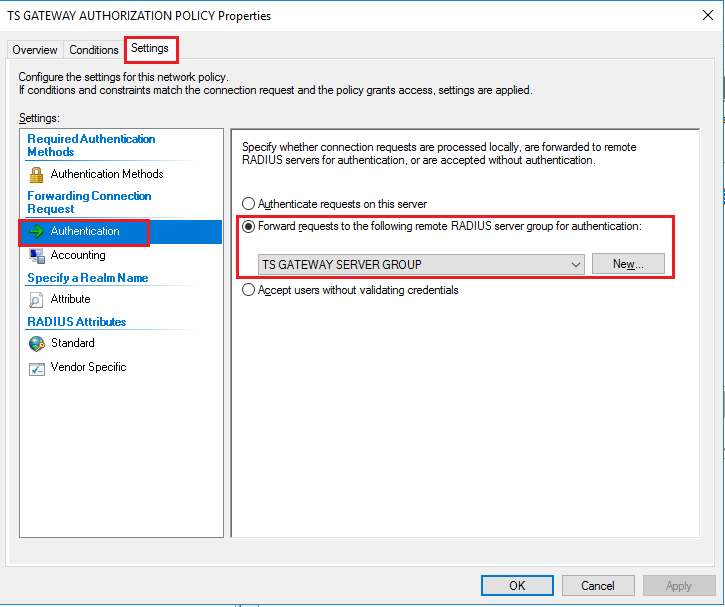
- Click "Apply" to save the changes.