It is assumed that the Cisco ASA is setup and operational. An existing Domain user can authenticate using a Domain AD password and access applications, your users can access through IPSec VPN and/or SSL VPN using Domain accounts.
Register DualShield Radius Server
- Launch the Cisco Adaptive Security Device Manager (ASDM), select Configuration in top toolbar, select Device Management in the accordion menu on the bottom
- In the control panel on the left, select Users/AAA and select AAA Server Groups.
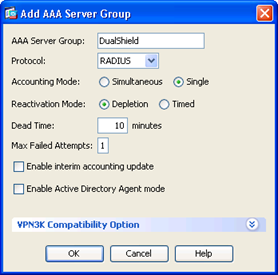
- Click "Add" button on the right
- Enter Name
- Select "RADIUS" protocol
- Set "Max Failed Attempts" to 1
- Click "OK" when completed
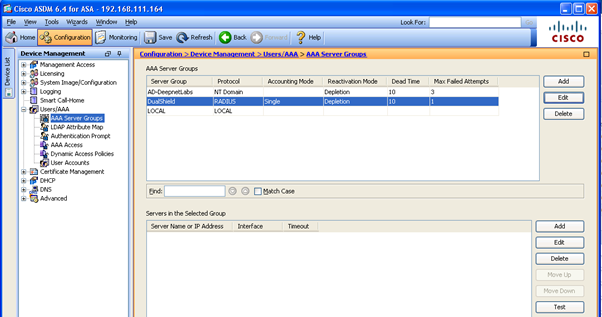
- Select the newly created AAA server, i.e. DualShield
- Click "Add" in the "Servers in the Selected Group"
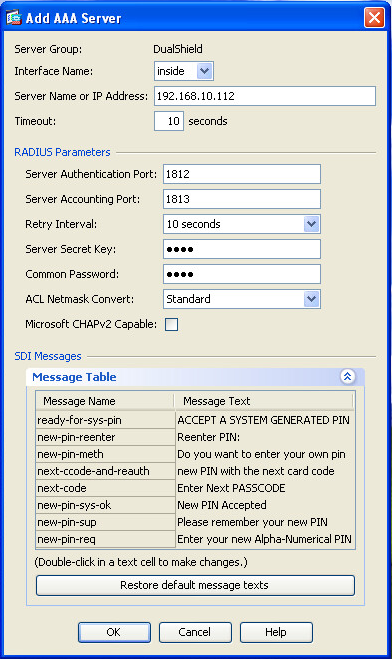
- Select "inside" interface
- Enter the IP address of the DualShield Radius Server
- Set Authentication Port to 1812
- Set Accounting Port to 1813
- Enter "Server Secret Key"
- Unselect "Microsoft CHAPv2 Capable"
- Click "OK" when completed
- Click "Apply" button to save settings
Related Articles