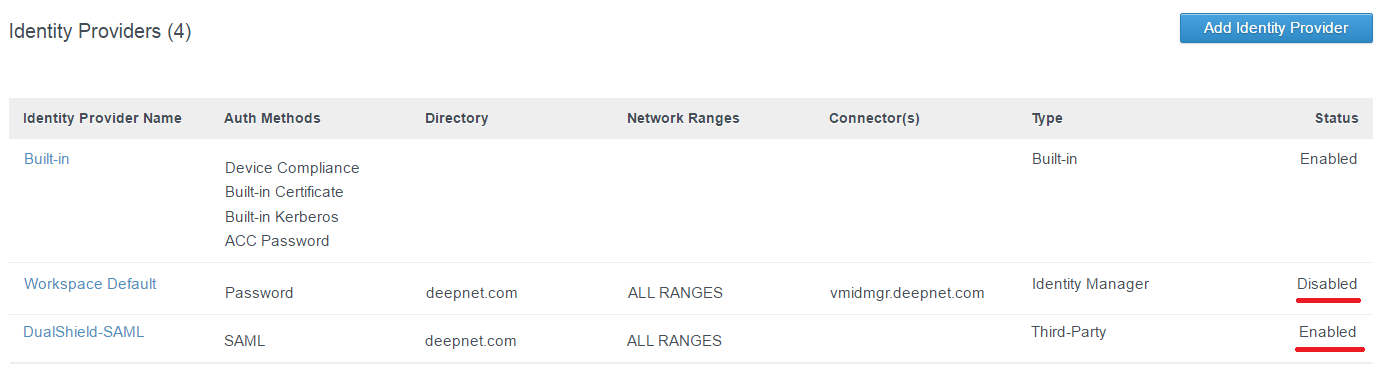
- Login to the VMware Identity Manager Administrator Console
- Navigate to " Identity & Access Management | Identity Providers"
- Click the default Identity Provider "Workspace Default" if you do not change the name.
- Click the "Disable IdP", and Back to IdP List
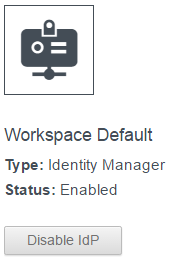
![DualShield MFA Platform > Enable Identity Provider [vIDM] > image2017-2-10 17:31:56.png](/download/attachments/35947852/image2017-2-10%2017%3A31%3A56.png?version=1&modificationDate=1587386377000&api=v2)
- Select the newly create Identity Providers, i.e. "DualShield-SAML" and Press "Enable IdP"
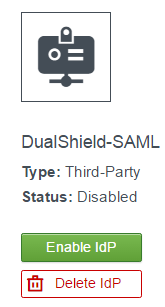
![DualShield MFA Platform > Enable Identity Provider [vIDM] > image2017-2-10 17:31:1.png](/download/attachments/35947852/image2017-2-10%2017%3A31%3A1.png?version=1&modificationDate=1587386377000&api=v2)
![DualShield MFA Platform > Enable Identity Provider [vIDM] > image2017-2-10 17:37:10.png](/download/attachments/35947852/image2017-2-10%2017%3A37%3A10.png?version=1&modificationDate=1587386377000&api=v2)