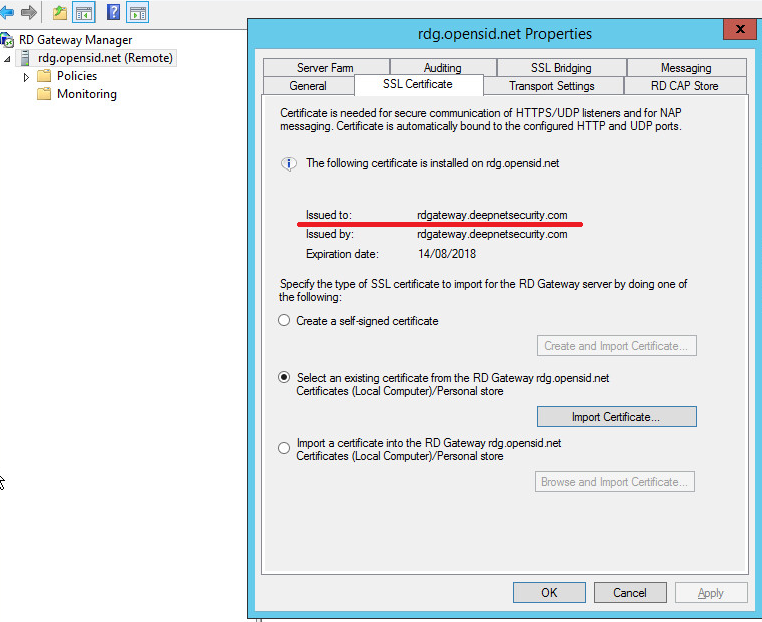
- Launch the "RD Gateway Manager", expand the server, e.g. "rdg.opensid.net".
- Right click "Properties", select "SSL Certificate" tab.
There are three ways to install a certificate. Make sure that the certificate is issued to the gateway's external domain name, i.e. "rdgateway.deepnetsecurity.com".
![DualShield MFA Platform > Install server certificate [RDG] > image2018-2-13_16-4-5.png](/download/attachments/85558316/image2018-2-13_16-4-5.png?version=1&modificationDate=1668187294000&api=v2)
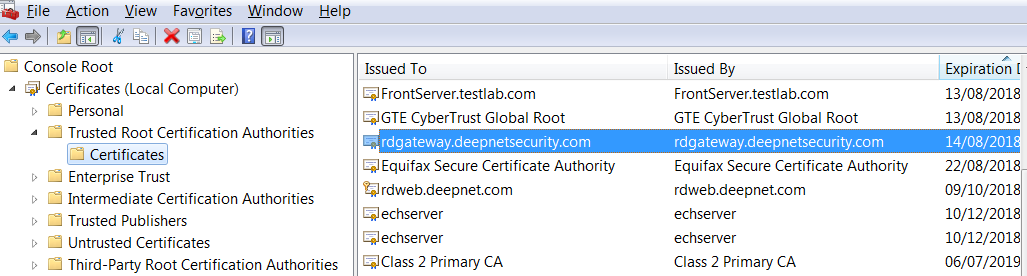
Note: If you are using the self-signed certificate, the certificate has to be installed as a trusted root CA certificate on client machines where the remote desktop client is running.
![DualShield MFA Platform > Install server certificate [RDG] > image2018-2-13_18-33-45.png](/download/attachments/85558316/image2018-2-13_18-33-45.png?version=1&modificationDate=1668187294000&api=v2)