The general way for an administrator to configure is to add or remove cipher suites in the registry editor. The path to do this is "HKEY_LOCAL_MACHINE\SOFTWARE\Deepnet Security\DUAP\WIN" and configure ciphers for the multi-string REG_SZ values "TLS12Ciphers and TLS13Ciphers". 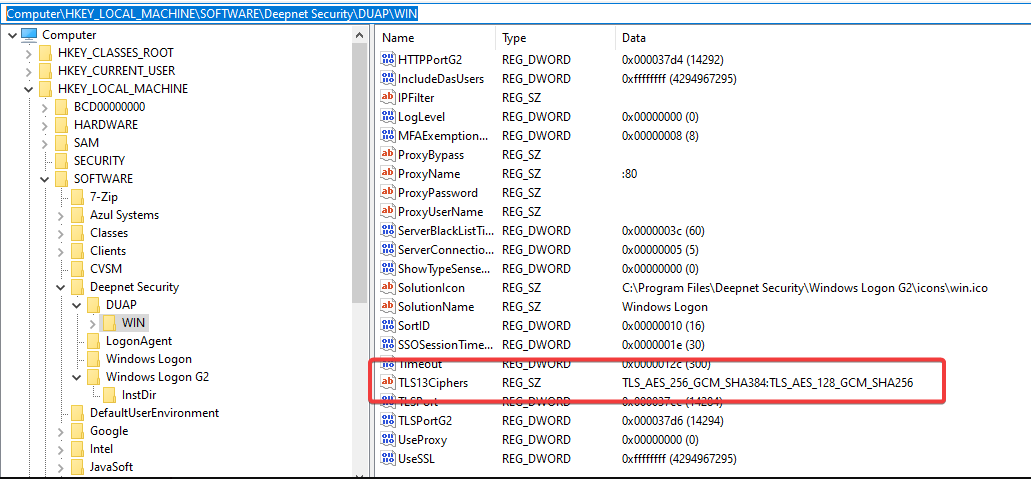
Supported Ciphers are as follows: | Code Block |
|---|
  Supported Server Cipher(s):
Preferred TLSv1.3  128 bits  TLS_AES_128_GCM_SHA256        Curve 25519 DHE 253
Accepted  TLSv1.3  256 bits  TLS_AES_256_GCM_SHA384        Curve 25519 DHE 253
Accepted  TLSv1.3  256 bits  TLS_CHACHA20_POLY1305_SHA256  Curve 25519 DHE 253
Preferred TLSv1.2  256 bits  ECDHE-RSA-AES256-GCM-SHA384   Curve 25519 DHE 253
Accepted  TLSv1.2  128 bits  ECDHE-RSA-AES128-GCM-SHA256   Curve 25519 DHE 253
Accepted  TLSv1.2  256 bits  ECDHE-RSA-AES256-SHA384       Curve 25519 DHE 253
Accepted  TLSv1.2  128 bits  ECDHE-RSA-AES128-SHA256       Curve 25519 DHE 253
Accepted  TLSv1.2  256 bits  AES256-GCM-SHA384
Accepted  TLSv1.2  128 bits  AES128-GCM-SHA256
|
|