Versions Compared

Key

  • This line was added.
  • This line was removed.
  • Formatting was changed.

...

Section
bordertrue


Column

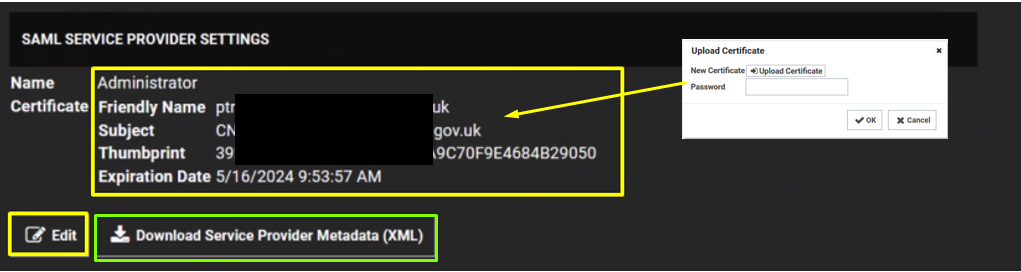
Click the Edit button in the SAML Service Providers section.

Type a name for your service provider,  in the Name text box.

Click the Select Certificate link. The Upload Certificate popup appears:

Click the Upload Certificate button to upload your commercial SSL certificate (In .Usually in pfx format)

Type Password

Click OK.

Click on Download Service Provider Metadata.


Column
width50%


Panel
borderColor#9EBEE5
bgColor#f0f0f0
borderWidth1px

Image Modified


Section
bordertrue


Column

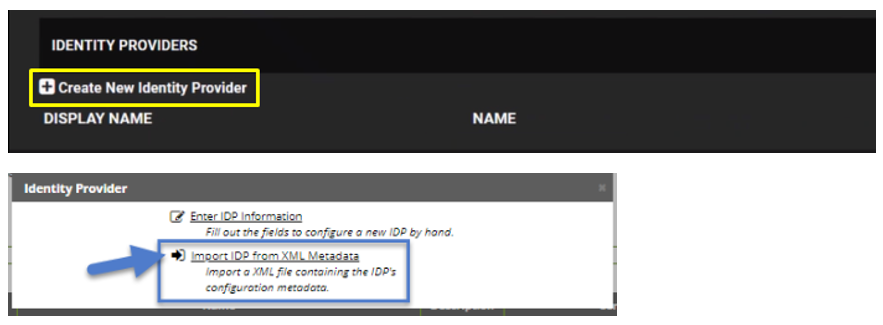
Under Identity Providers click on Create New Service Provider

Click Import IDP from XML Metadata and select the IdP metadata.xml file you saved previously. (refer to Obtain the IDP Metadata File section)


Column
width50%


Panel
borderColor#9EBEE5
bgColor#f0f0f0
borderWidth1px

Image Added