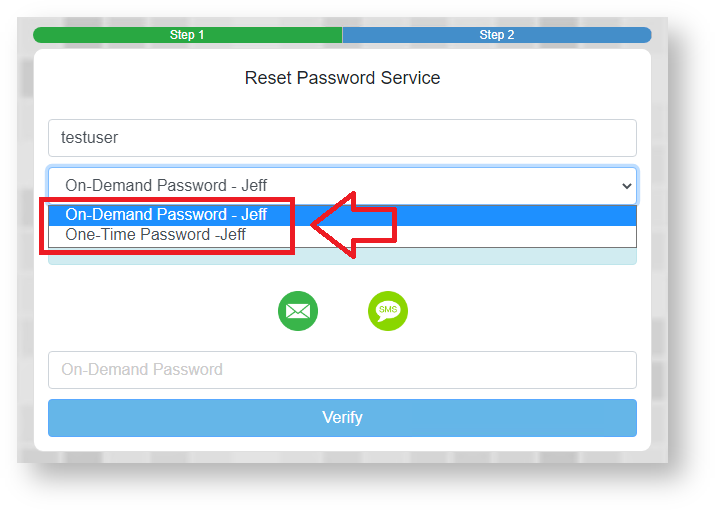
The names used to represent the authentication methods can be customised (both the names presented during authentication, and the names displayed in the management console).
To customise these names you will need to make modifications to files stored in subfolders of the DualShield installation directory.
From version 5.9.5 onwards customisation of the authentication method names for both the administrators console and the Single Sign-On Console are performed by property changes in the following file;
| Portals Customised | Subfolder | File |
|---|---|---|
DualShield Access Console (DAC) Single Sign-On (SSO) | \tomcat\dualapp\das5\WEB-INF\grails-app\i18n | “messages.properties” |
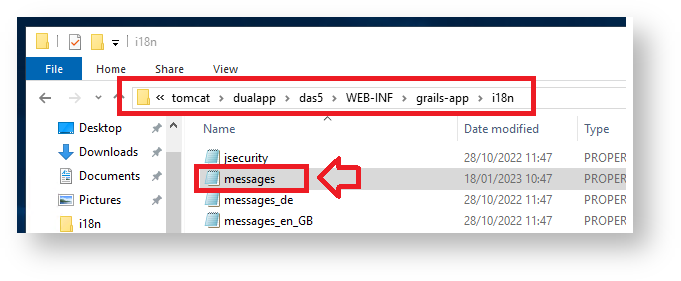
To customise authentication method names that are displayed in both the DualShield Access Console and the Single Sign-On portal you will need to examine the contents of this file and replace the existing prompts entered against the parameter for the specific authentication method that you want to customise (see table below for examples):
| Method Name | Parameter |
|---|---|
| One-Time Password | method.otp |
| On-Demand Password | method.odp |
| Grid Card | method.grid.card |
| Computer Fingerprint | method.computer.fingerprint |
| Computer DeviceID | method.computer.deviceid |
| Static Password | method.static.pass |
| Emergency Code | method.ecode |
| Question and Answer | method.qna |
As an example to replace the default names for the authentication methods "One-Time Password" and "On-Demand Password" you would edit the following parameters in the sub-folder "\tomcat\dualapp\das5\WEB-INF\grails-app\i18n";
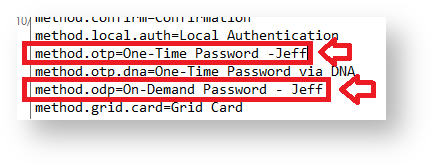
After replacing these parameters and saving the file the customisation will cause the management console to replace the text when authentication methods are listed in the management console.
After applying the above changes for the properties of the parameters "On-Demand Password" and "One-Time Password", the authentications are now displayed in the management console as follows;

If we now log in to a protected application we will now see the above changes have also customised we can see that the names of the authentication methods displayed during authentication have also been customised;